Posts

[eBook] Understanding mobile application development for everybody

Image
Problematic Mobile applications are used by many people these days. Many craftsmen, freelancers and others people have at the point, the idea to make their own mobile application to support their business. In general it's a really good idea to do so. Providing a quality application to your customer is always a PLUS and sometimes a MUST.  The problem is that sometimes, we don't know what creating an application implies and we don't know how to start... ➡️ This often leads to time and money loss 🤯 Guide to design your mobile app [ free eBook ] Below, you will find a link to download a presentation that I wrote about how to design your mobile app.  This is a short document that will help you to understand all the steps needed in order to publish a stable and a quality application .  We also cover the 'delays' problematic as many people think that a mobile app is fast to develop, so they underestimate deadlines... You will also find a few tips about Play Store and the ...

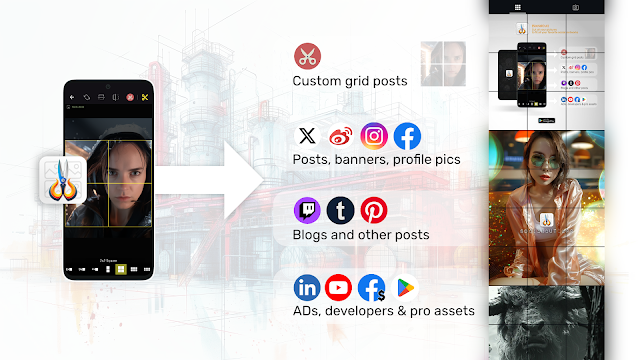
[SocialCut] released! Make instagram grids, panorama and more

Image
  [SocialCut] Released on Google Play Store ! Hello guys, today, just an announcement to inform you that SocialCut has been released and is now available for everybody ! 📱 Download SocialCut On Google Play Store 🧑🏻‍🎨 SocialCut is the ideal tool for: digital content creator community manager, digital artist influencer digital media manager , freelance developer, or simply a daily picture user 💡 And remember that SocialCut is available in the following languages: - English, Spanish, French, Chinese (simplified), Japanese  

[SocialCut] The perfect app for digital content creators

Image
  [SocialCut] The perfect app for digital content creators If you have to deal with digital pictures and social networks, you may have noticed that there are so many simple tools like applications to generate grids for Instagram. We can note apps like: PhotoSplit : https://play.google.com/store/apps/details?id=co.techpositive.photosplit&hl=en_US Griddy : https://apps.apple.com/us/app/griddy-split-grid-post-maker/id1114106704?uo=4 PanoraSplit for instagram : https://apps.apple.com/us/app/panorasplit-for-instagram/id1463280209 and much more... SocialCut is a new Android application that extends this principle. With SocialCut you will be able to cut/crop/resize pictures in order to publish it to your favorite social networks . Google Play Store - SocialCut SocialCut for Android If you are: digital content creator community manager, digital artist influencer digital media manager , freelance developer, or simply a daily picture user SocialCut is made for you! You will be able to...

[XAMARIN FORMS] Background task for 'closed' applications

Image
Background task for 'closed' applications Handling a background task in Xamarin Forms, even when the application is closed, can be challenging due to the mobile operating systems' restrictions on background activities. Here's a detailed solution using a combination of Dependency Service , Background Services , and Platform-Specific Implementations . Step 1: Create an Interface First, create an interface in your shared Xamarin Forms project that defines the method for starting the background task. public interface IBackgroundTask { void StartBackgroundTask(); } Step 2: Implement Platform-Specific Services Android Implementation: In your Android project, create a service that implements the IBackgroundTask interface. Create a Service: [Service] public class MyBackgroundService : Service { public override IBinder OnBind(Intent intent) => null; public override StartCommandResult OnStartCommand(Intent intent, StartCommandFlags flags, int startId...

[Xamarin Forms] Entry with rounded borders in your app

Image
Entry with rounded borders in your app (Xamarin Forms, NET MAUI) I know for some people it will be obvious, but I always seepeople asking how to make a custom Entry control with rounded borders...  To add rounded corners globally to Entry controls in a Xamarin Forms or .NET MAUI application, you can define a Style in the App.xaml (or Styles.xaml for .NET MAUI). This style will automatically apply to all Entry controls in your app, saving you from having to manually style each one. Example Define the global style in App.xaml : <Application.Resources> <ResourceDictionary> <Style TargetType="Entry"> <Setter Property="BackgroundColor" Value="White"/> <Setter Property="TextColor" Value="Black"/> <Setter Property="CornerRadius" Value="10"/> <Setter Property="HeightRequest" Value="50"/> ...

[SocialCut] for Android, really nice picture application!

Image
[SocialCut] for Android, really nice picture application! Hello programmers, Just a few words to present you a new application that will be released soon. And you can get it for free if you pre-register on the Play Store! SocialCut Android app lets you crop your pictures in a few clicks to fit & publish it to your favorite social network! A lot of cut templates are already available, you just have to choose one then adjust the picture position => cut it as you see it. You can check SocialCut's Instagram account to see a few examples of cut pictures ( @ig: socialcut.app ). ___ 🚨 SocialCut is still in 'pre-registration' stage! Register to get the fully functionnal app for free 💲 when it will be released (*soon)!🚨 Get it on the Play store: https://play.google.com/store/apps/details?id=com.djooleean.socialcut Or official website: https://socialcut.app Let me your comments, and enjoy! Best regards, SocialCut on Youtube

[Flutter Tips] Remove the "DEBUG" banner of your Flutter app

Image
  [Flutter Tips] Remove the "DEBUG" banner of your Flutter app When you start coding a new application with Flutter, you  will surely see a banner with "Debug" text displayed on the top right corner of your app. To remove it, you will need to set the debugShowCheckedModeBanner property of the MaterialApp (or CupertinoApp ) widget to false . 🟢Here’s an example on how to do it: import 'package:flutter/material.dart'; void main() { runApp(MyApp()); } class MyApp extends StatelessWidget { @override Widget build(BuildContext context) { return MaterialApp( title: 'Flutter Demo', debugShowCheckedModeBanner : false, // This removes the debug banner home: Scaffold( appBar: AppBar( title: Text('No Debug Banner'), ), body: Center( child: Text('Hello, World!'), ), ), ); } } > debugShowCheckedModeBanner: false : This line ensures that the debug ban...