Posts

[SocialCut] The perfect app for digital content creators
Image
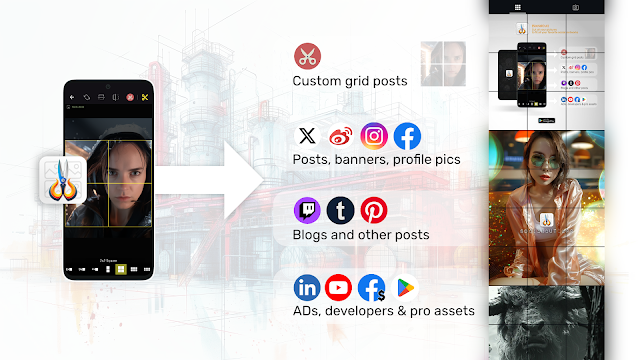
  [SocialCut] The perfect app for digital content creators If you have to deal with digital pictures and social networks, you may have noticed that there are so many simple tools like applications to generate grids for Instagram. We can note apps like: PhotoSplit : https://play.google.com/store/apps/details?id=co.techpositive.photosplit&hl=en_US Griddy : https://apps.apple.com/us/app/griddy-split-grid-post-maker/id1114106704?uo=4 PanoraSplit for instagram : https://apps.apple.com/us/app/panorasplit-for-instagram/id1463280209 and much more... SocialCut is a new Android application that extends this principle. With SocialCut you will be able to cut/crop/resize pictures in order to publish it to your favorite social networks . Google Play Store - SocialCut SocialCut for Android If you are: digital content creator community manager, digital artist influencer digital media manager , freelance developer, or simply a daily picture user SocialCut is made for you! You will be able to...

[XAMARIN FORMS] Background task for 'closed' applications

Image
Background task for 'closed' applications Handling a background task in Xamarin Forms, even when the application is closed, can be challenging due to the mobile operating systems' restrictions on background activities. Here's a detailed solution using a combination of Dependency Service , Background Services , and Platform-Specific Implementations . Step 1: Create an Interface First, create an interface in your shared Xamarin Forms project that defines the method for starting the background task. public interface IBackgroundTask { void StartBackgroundTask(); } Step 2: Implement Platform-Specific Services Android Implementation: In your Android project, create a service that implements the IBackgroundTask interface. Create a Service: [Service] public class MyBackgroundService : Service { public override IBinder OnBind(Intent intent) => null; public override StartCommandResult OnStartCommand(Intent intent, StartCommandFlags flags, int startId...

[Xamarin Forms] Entry with rounded borders in your app

Image
Entry with rounded borders in your app (Xamarin Forms, NET MAUI) I know for some people it will be obvious, but I always seepeople asking how to make a custom Entry control with rounded borders...  To add rounded corners globally to Entry controls in a Xamarin Forms or .NET MAUI application, you can define a Style in the App.xaml (or Styles.xaml for .NET MAUI). This style will automatically apply to all Entry controls in your app, saving you from having to manually style each one. Example Define the global style in App.xaml : <Application.Resources> <ResourceDictionary> <Style TargetType="Entry"> <Setter Property="BackgroundColor" Value="White"/> <Setter Property="TextColor" Value="Black"/> <Setter Property="CornerRadius" Value="10"/> <Setter Property="HeightRequest" Value="50"/> ...

[SocialCut] for Android, really nice picture application!

Image
[SocialCut] for Android, really nice picture application! Hello programmers, Just a few words to present you a new application that will be released soon. And you can get it for free if you pre-register on the Play Store! SocialCut Android app lets you crop your pictures in a few clicks to fit & publish it to your favorite social network! A lot of cut templates are already available, you just have to choose one then adjust the picture position => cut it as you see it. You can check SocialCut's Instagram account to see a few examples of cut pictures ( @ig: socialcut.app ). ___ 🚨 SocialCut is still in 'pre-registration' stage! Register to get the fully functionnal app for free 💲 when it will be released (*soon)!🚨 Get it on the Play store: https://play.google.com/store/apps/details?id=com.djooleean.socialcut Or official website: https://socialcut.app Let me your comments, and enjoy! Best regards, SocialCut on Youtube

[Flutter Tips] Remove the "DEBUG" banner of your Flutter app

Image
  [Flutter Tips] Remove the "DEBUG" banner of your Flutter app When you start coding a new application with Flutter, you  will surely see a banner with "Debug" text displayed on the top right corner of your app. To remove it, you will need to set the debugShowCheckedModeBanner property of the MaterialApp (or CupertinoApp ) widget to false . 🟢Here’s an example on how to do it: import 'package:flutter/material.dart'; void main() { runApp(MyApp()); } class MyApp extends StatelessWidget { @override Widget build(BuildContext context) { return MaterialApp( title: 'Flutter Demo', debugShowCheckedModeBanner : false, // This removes the debug banner home: Scaffold( appBar: AppBar( title: Text('No Debug Banner'), ), body: Center( child: Text('Hello, World!'), ), ), ); } } > debugShowCheckedModeBanner: false : This line ensures that the debug ban...

[Xamarin Forms]Page navigation summary

Image
[Xamarin Forms] Page navigation summary 1- The different navigation possibilities In this article will we list and sum up how we can navigate inside a Xamarin Forms application.  In Xamarin.Forms, you can navigate between pages using several methods, we will enumerate it and give a brief description / use case for each : Push/Pop Navigation : Using Navigation.PushAsync() and Navigation.PopAsync() for stack-based navigation. Modal Navigation : Using Navigation.PushModalAsync() and Navigation.PopModalAsync() for displaying pages modally. Master-Detail Navigation : Using MasterDetailPage to manage a master menu and a detail page. Tabbed Navigation : Using TabbedPage for navigation between different tabs. Carousel Navigation : Using CarouselPage to swipe through pages in a carousel-style interface. Shell Navigation : Using Xamarin.Forms Shell for a unified navigation paradigm with URL-based routing and flyout menus. Custom Navigation : Or if you want to customize and design a g...

[Xamarin Forms] Complete guide to design a TOAST component

Image
  [Xamarin Forms] Complete guide to design a TOAST component In this guide, we will first show you how to design a toast component in Xamarin Forms (adding transition animations to the component), then in a second part, we list some existing controls that you can use directly... Custom Toast design in Xamarin Forms  Designing a "toast" component in Xamarin Forms involves creating a custom control to display brief messages to the user.  I will show you bellow a simple example on how to create a Toast component, and we will also how to add transition animation. Here are the steps to design and implement a toast component: Step 1: Create the Toast View First, you need to create a custom view that represents the toast message. You can add all the UI controls that you need to fit your needs (like an icon image...) 1.1 Create a ToastView class Create a new class ToastView that inherits from ContentView . public class ToastView : ContentView { public ToastView ( strin...